In the nonprofit world, we often wear ten different hats at once. We are the marketers, the web developers, the data analysts, and the fundraisers. For a long time, that meant settling for “good enough” because we didn’t have the budget for a full creative agency.
That’s changing. I’ve been experimenting with a specific stack of AI tools that make high-level marketing and app development accessible to anyone. Even if you don’t know code. Here is how I’m using them and why they are game-changers for mission-driven work.
1. Professional Web Design (Without the Development Bill)
Canva
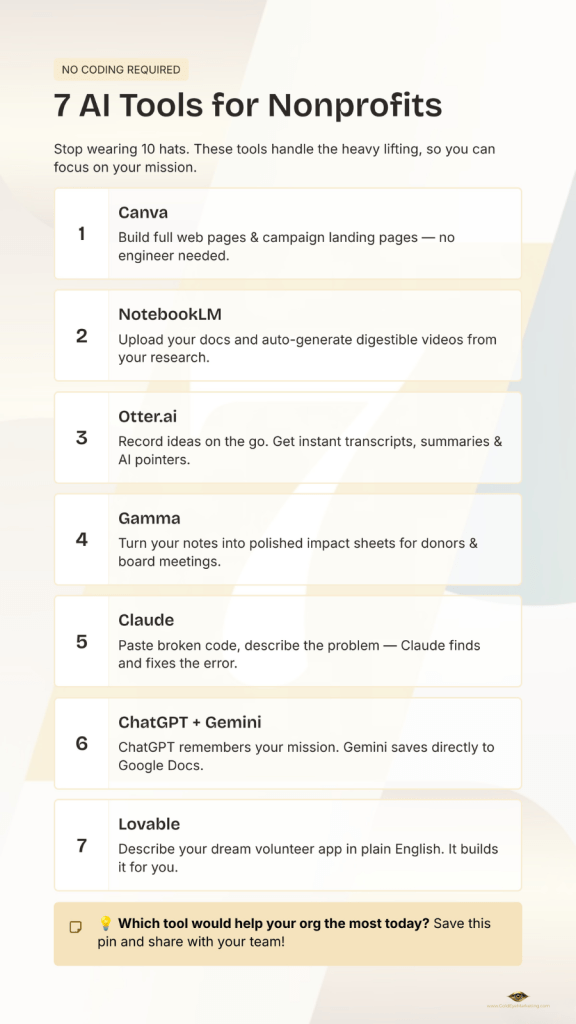
Most of us use Canva for social media graphics, but did you know you can build entire web pages there? You just give Canva your idea, and it creates a beautiful, responsive layout for you.
- The Nonprofit Edge: If you need a custom landing page for a specific campaign, you can design it in Canva, copy the custom code, and drop it directly into your website’s HTML. You get a custom, high-end look without needing an engineer.
2. Content Creation on Autopilot
NotebookLM
This is one of my favorite “hidden gems.” When you process your research or documents through NotebookLM, it can actually generate short videos for you.
- The Nonprofit Edge: You don’t have to spend hours editing on your phone or giving complex directions. It takes your source material and turns it into a digestible video format automatically.
3. Capturing Inspiration on the Go
Otter.ai
If you’re like me, your best ideas happen when you’re driving or away from your desk. I use Otter for conversations and brainstorming.
- The Nonprofit Edge: You can record your thoughts while driving down the road, and Otter will not only transcribe them but provide AI-generated pointers and summaries. It’s like having a digital assistant in the passenger seat.
4. Rapid-Fire Impact Reports
Gamma
Templates can feel restrictive. With Gamma, I make fact sheets by simply uploading a document or typing in my ideas.
- The Nonprofit Edge: It builds the layout around your content instead of forcing your content into a box. It’s the fastest way to create a professional-looking “impact sheet” for a board meeting or a donor pitch.
5. The “Non-Coder’s” Safety Net
Claude
I am not a coder or an engineer, but I often need things to work “under the hood.” I use Claude specifically for code reviewing.
- The Nonprofit Edge: If a piece of custom code on your site isn’t working, you can paste it into Claude, tell it what you’re trying to do, and it will find the error and give you the fix. It empowers non-technical staff to handle technical tasks.
6. Staying Organized with “Memory”
ChatGPT vs. Gemini
I use both, but for different reasons. ChatGPT has a “memory” function. It remembers your last project and the context of your past conversations, so you don’t have to explain your mission every time you start a new chat.
Gemini, on the other hand, has a great interconnectivity. Since it’s a Google tool, you can save your results directly to a Google Doc or Sheet with one click.
- The Nonprofit Edge: If you live in Google Workspace, Gemini saves you the “download and upload” dance, keeping your workflow seamless.
7. Building Your Own Solutions
Lovable
If you’ve ever said, “I wish we had an app for our volunteers,” Lovable is your answer. It’s an app-building tool where you describe what you want in plain English and it builds it for you.
- The Nonprofit Edge: It’s easy to implement and even allows you to add subscriptions or user management. You don’t need a $50k development budget to build a functional tool for your community anymore.
Final Thoughts
The goal of using AI isn’t to replace the human element of our nonprofits; it’s to handle the “heavy lifting” so we can get back to the actual mission. Whether it’s building an app on Lovable or a webpage in Canva, these tools are leveling the playing field.
Which of these would help your organization the most today?
 Gold Eye Marketing
Leave a comment